Search Book Elements
Click the Elements tab in the section sidebar to find specific visual and text elements across your entire manuscript, or press Ctrl+Shift+L (Cmd+Shift+L on Mac). Pick the element types you care about from the Select Element Types dropdown and every match appears, grouped by section.
Searchable Elements
Images
- Images - All illustrations and graphics within your text
- Header Images - Images that appear at the beginning of sections
- Background Images - Print only background images
Text Elements
- Subheadings - Results show the exact level, like Subheading H2
- Blockquotes - Quoted text with special formatting
- Text Conversations - Chat-style message bubbles
- Callout Boxes - Special boxes that have borders around your elements
- Tables - Standard row and column tables for clean organization
- Bullet Lists and Ordered Lists - Unordered and numbered lists
- Footnotes/Endnotes - Every note reference in your text; each result is labeled Footnote or Endnote
- Links - Hyperlinks in your text (distinguishes between image links and text links)
Layout
- Grids - Multi-cell image and text grids
- Columns - Text flowed into 2 or 3 columns
- Ornamental Breaks - Decorative images that separate scenes within chapters
- Page Breaks - Manual page breaks inserted throughout your book
- Device Specific Blocks - Content marked as E-Book only or Print only
Formatting
- Custom Presets - Every element carrying a custom preset, marked with a PRESET badge
- Letter Spacing - Every paragraph with custom letter spacing, marked with a LETTER SPACING badge
Jump the Editor and Preview Together
Click any result and Lacuna takes you there on both sides at once: the editor switches to the right section and selects the element, and your open preview turns to the same spot. In the e-reader previews, the element flashes briefly so your eye lands on it immediately.
The same syncing works from text search results, and you can trigger it manually any time with the editor and previewer sync shortcuts.
Accessibility Alerts
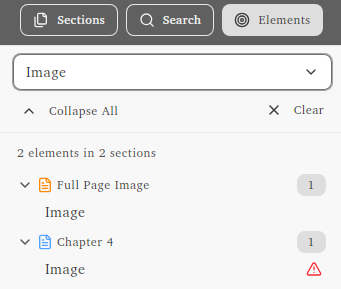
Red alert icons appear next to images missing alt text for EPUB accessibility compliance.