How to Use Handwriting
Handwriting blocks are perfect for letters, diary entries, notes, and any text that should appear handwritten in your book. For texting between characters, see text message conversations.
How to Create Handwriting
- Select the text you want to format as handwriting
- Click the handwriting icon in your editor toolbar
- View your formatted handwriting text instantly
Customizing Your Handwriting
When you select a handwriting block, the inline style panel appears on the left side of the editor. This panel has two tabs that give you full control over your handwriting’s appearance: Text and Spacing.
Text
- Font: Choose from handwriting-styled fonts
- Size: Set the font size of your handwriting text
- Line Spacing: Control the space between lines of text
- Alignment: Left, Center, Right, or Justified
Spacing
- Spacing Around Handwriting: the space on all four sides of the handwriting block.
- Spacing Between: the space between paragraphs inside the block.
- Use Indentation: indent the first line of each paragraph inside the block.
- Trim Top Spacing on Page Start: when the block lands at the top of a new page in print, removes the space above it so it sits flush with the top margin. (Print only.)
Using Presets
You can save and reuse handwriting styles with presets. This makes it easy to apply consistent formatting across all handwriting blocks in your book.
Finding Handwriting
Use the Elements tab in the section sidebar to find all handwriting in your book and jump directly to any of them.
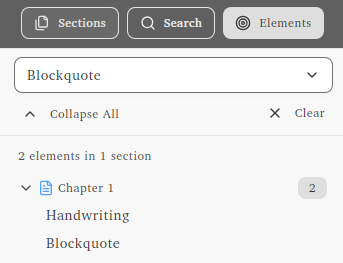
Why Use Handwriting Instead of a Blockquote?
You could technically use a blockquote and set it to a handwriting font. The difference is categorization. Handwriting elements appear in their own category in the Elements tab, making it easy to find and navigate all handwritten text in your book. If you have letters, diary entries, or notes scattered throughout your manuscript, using the handwriting feature keeps them organized and easy to locate.