Manage Your Lacuna License
Your license turns on Generate in Lacuna. Activate it on each computer you use, and move it to a new computer whenever you need to.
- What it does
- Activating turns on Generate: your EPUB, print-ready PDF and DOCX.
- Where to find it
- The key near the bottom of the side menu on the right, or the Help menu.
- How many computers
- As many at once as your license covers: one, two or three.
- Before you start
- Have your license key ready. It comes by email when you buy.
How to activate your license
- Click the red key near the bottom of the side menu on the right, then Activate with license key. Or open the Help menu and choose Activate License.
- Paste your license key from your purchase email.
- Click Activate Now!

Generate turns on right away, with your book just as you left it. The key in the side menu turns gray, and its tooltip now says Manage License.
How to see your license
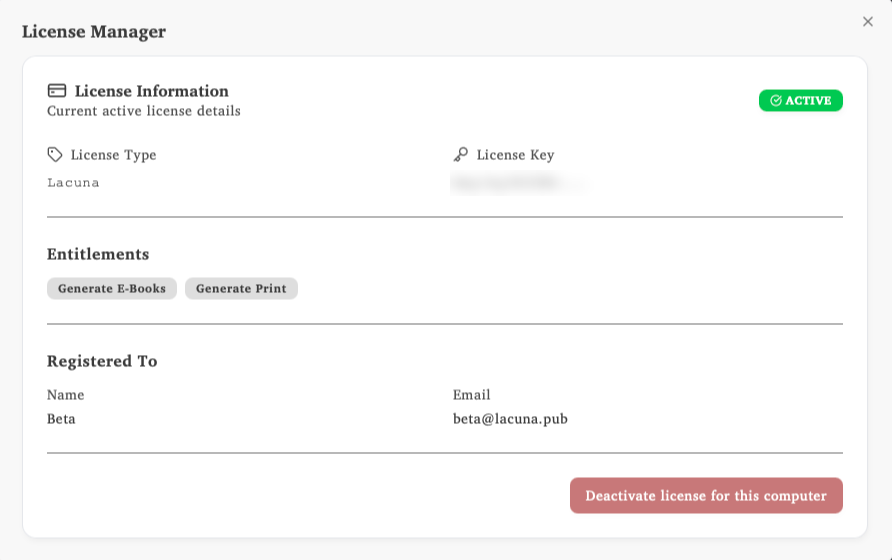
Click the key near the bottom of the side menu, or open the Help menu and choose License Manager. The License Manager shows that your license is active, what it lets you generate, and who it is registered to.
How to move your license to another computer
Your license is active on as many computers at once as you bought: one, two or three. To use it on a different computer, deactivate it on one you no longer need, then activate it on the new one.
- Open the License Manager on the computer you are leaving.
- Click Deactivate license for this computer.
- Activate your license on the new computer with the same key.
Do this before you sell, replace or reset a computer. If you can no longer open Lacuna on the old one, email support@lacuna.pub and we’ll move your license for you.
Questions
Where is my license key?
It comes by email when you buy. If you can’t find it after a few minutes, check your spam or junk folder, then email support@lacuna.pub.
My license says it is already active on too many computers
Your license is active on every computer it covers. Deactivate it in the License Manager on a computer you no longer use, then activate it again. If you can’t reach that computer, email support@lacuna.pub.
Can I use my license on Windows and on a Mac?
Yes. Your license key works in Lacuna on Windows, Mac and Linux, and each computer counts once, whatever it runs.
Do I need to pay for updates?
No. Every license includes every update. See Lacuna software updates.
I want to use Lacuna on more computers
Licenses cover one, two or three computers. See pricing and plans, or email support@lacuna.pub and we’ll help.