Keyboard Shortcuts
Speed up your editing with keyboard shortcuts. Press F1 in Lacuna to see all shortcuts.
Text Formatting
| Action | Windows | Mac |
|---|---|---|
| Bold | Ctrl+B | Cmd+B |
| Italic | Ctrl+I | Cmd+I |
| Underline | Ctrl+U | Cmd+U |
| Add/Edit Link | Ctrl+K | Cmd+K |
| Blockquote | Ctrl+Shift+B | Cmd+Shift+B |
| Text Conversation | Ctrl+Shift+T | Cmd+Shift+T |
| Callout Box | Ctrl+Shift+C | Cmd+Shift+C |
| Add Footnote | Ctrl+Shift+N | Cmd+Shift+N |
Text Editing
| Action | Windows | Mac |
|---|---|---|
| Undo | Ctrl+Z | Cmd+Z |
| Redo | Ctrl+Y | Cmd+Y |
| Find in Section | Ctrl+F | Cmd+F |
| Replace in Section | Ctrl+H | Cmd+H |
Project-Wide
| Action | Windows | Mac |
|---|---|---|
| Undo (Project Wide) | Ctrl+Shift+Z | Cmd+Shift+Z |
| Redo (Project Wide) | Ctrl+Shift+Y | Cmd+Shift+Y |
| Find in Project | Ctrl+Shift+F | Cmd+Shift+F |
| Replace in Project | Ctrl+Shift+H | Cmd+Shift+H |
| Find Elements | Ctrl+Shift+L | Cmd+Shift+L |
File
| Action | Windows | Mac |
|---|---|---|
| New | Ctrl+N | Cmd+N |
| Open | Ctrl+O | Cmd+O |
| Save | Ctrl+S | Cmd+S |
| Save As | Ctrl+Shift+S | Cmd+Shift+S |
View
| Action | Windows | Mac |
|---|---|---|
| Section Explorer | Ctrl+Shift+E | Cmd+Shift+E |
| Device Preview | Ctrl+Shift+P | Cmd+Shift+P |
| Keyboard Shortcuts | F1 | F1 |
Bubble Menu
Select any text and a bubble menu appears with quick formatting options.
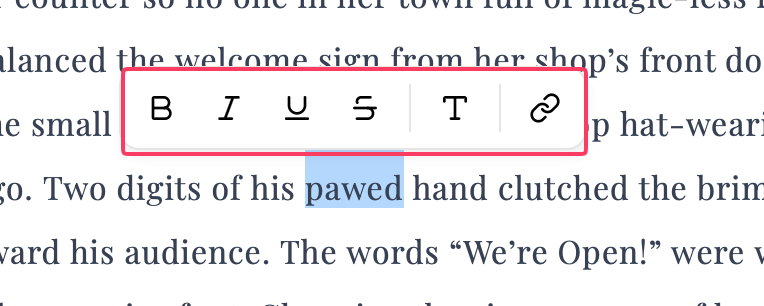
Select text, click an option, and keep editing. The menu disappears automatically.
Frequently Asked Questions
How do I use keyboard shortcuts?
For existing text:
- Select the text you want to format
- Press the keyboard shortcut
- Continue editing
For new text:
- Position your cursor where you want to start
- Press the keyboard shortcut to activate formatting
- Type your text with the formatting applied
- Press the shortcut again to turn off formatting
What’s the difference between section and project-wide actions?
Section actions (like Ctrl+Z for undo) only affect the section you’re currently editing.
Project-wide actions (like Ctrl+Shift+Z for project-wide undo) affect changes across your entire book, including section reordering, deletions, and metadata changes.